S3 Installation Placement
After S2 Know Your Device and the detection zone, decide before S4 Wall Mounting — while the plate can still be moved — which wall, how high, where the beam points, and whether strong reflectors are in path.
- Bedrooms, living rooms: §3.3–§3.4; see also S7 Room Types
- Fall detection, multi-person rooms: S8 Scenarios
3.1 Height & down-tilt
Tilt side mount (recommended): plate bottom 2–3 m above floor (typically 2.5 m), bracket preset 30° down.
Flat wall mount (~1.5 m, 0°) is for testing only — more interference; not recommended for production use.
When adding the device on the platform
Enter actual install height; down-tilt defaults to 30°. Use 0° only for flat test installs.
3.2 Tilt side mount (recommended)
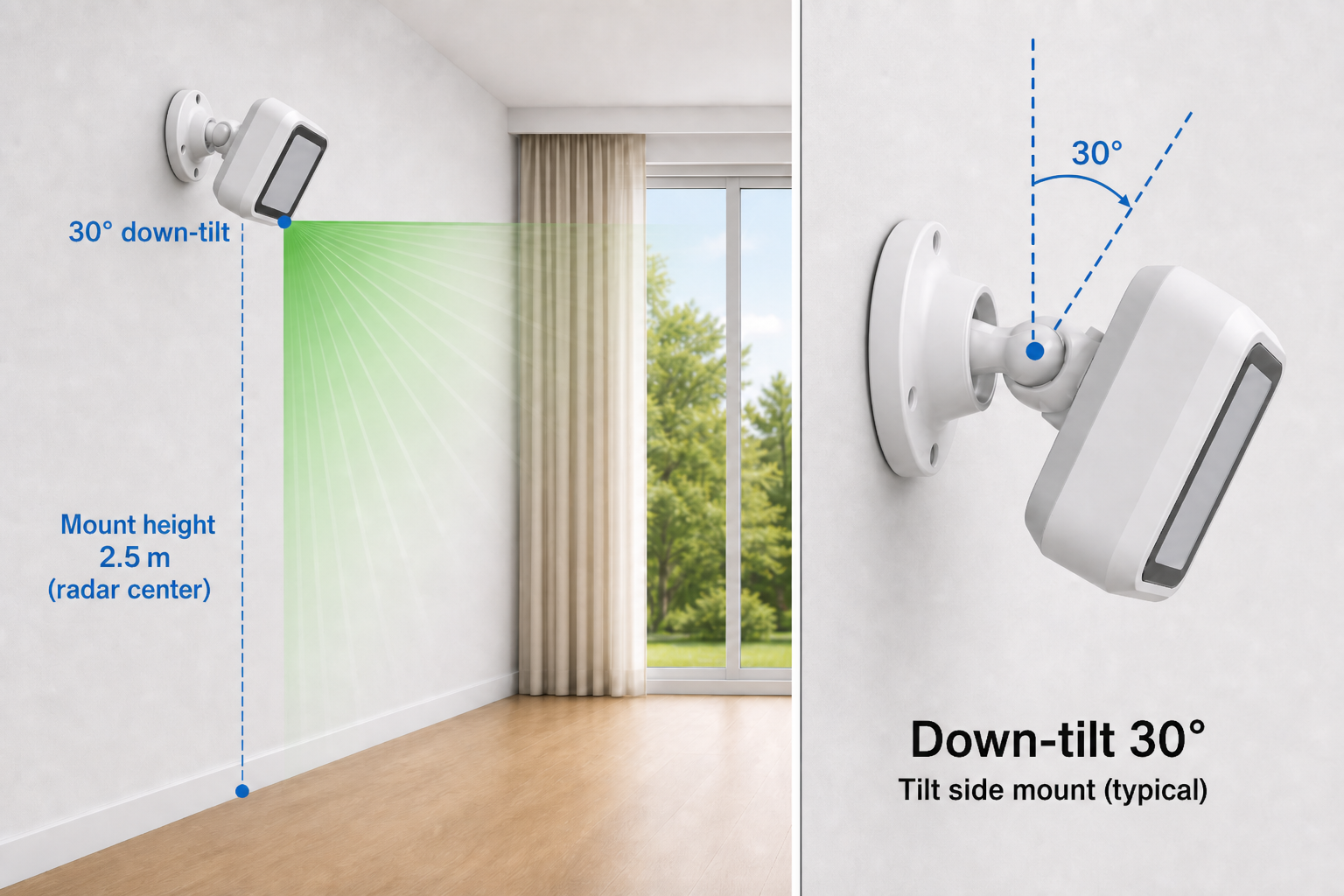
| Item | Requirement |
|---|---|
| Height | 2–3 m; 2.5 m typical |
| Down-tilt | 30° (preset on bracket) |
| Level | No left/right roll |
| Wall plate | Hole line vertical (see S4) |
3.3 Bedroom placement
In bedrooms, mount on the foot-of-bed side wall (long side of the bed). The unit covers the bed surface, foot walkway, and floor from the side — best for bed-exit and fall alerts.
Do not mount on the wall above the headboard — coverage misses the bed and floor.
| Guidance | |
|---|---|
| Preferred | Foot-of-bed side wall |
| Avoid | Headboard wall / above-head |
| Occlusion | Heavy curtains or bed rails blocking the beam reduce performance |
| Strong reflectors | See §3.4 |
At the candidate wall, imagine the 30° down-tilt beam: if it hits a window opposite the bed, mirrored wardrobe, or metal headboard, pick another wall or shift the mount — software calibration cannot fully fix strong reflection.
More room types: S7.2 Bedroom.
3.4 General placement
Quick checklist — reflectors & vibration
Before fixing the plate (details in S6.2):
- Not on-axis: large glass, mirrors, TV/screens, big metal cabinets/racks
- Keep distance from the above; stay away from vibration sources — AC units, ceiling fan lights, large ceiling fans
- Fixed mount only — no hand-hold or unstable placement
Coverage & clear view
- Choose walls with open view, no large obstacles
- Check S2.4 blue zone — bed, walkways, and daily activity should fall inside
3.5 Common wrong installs
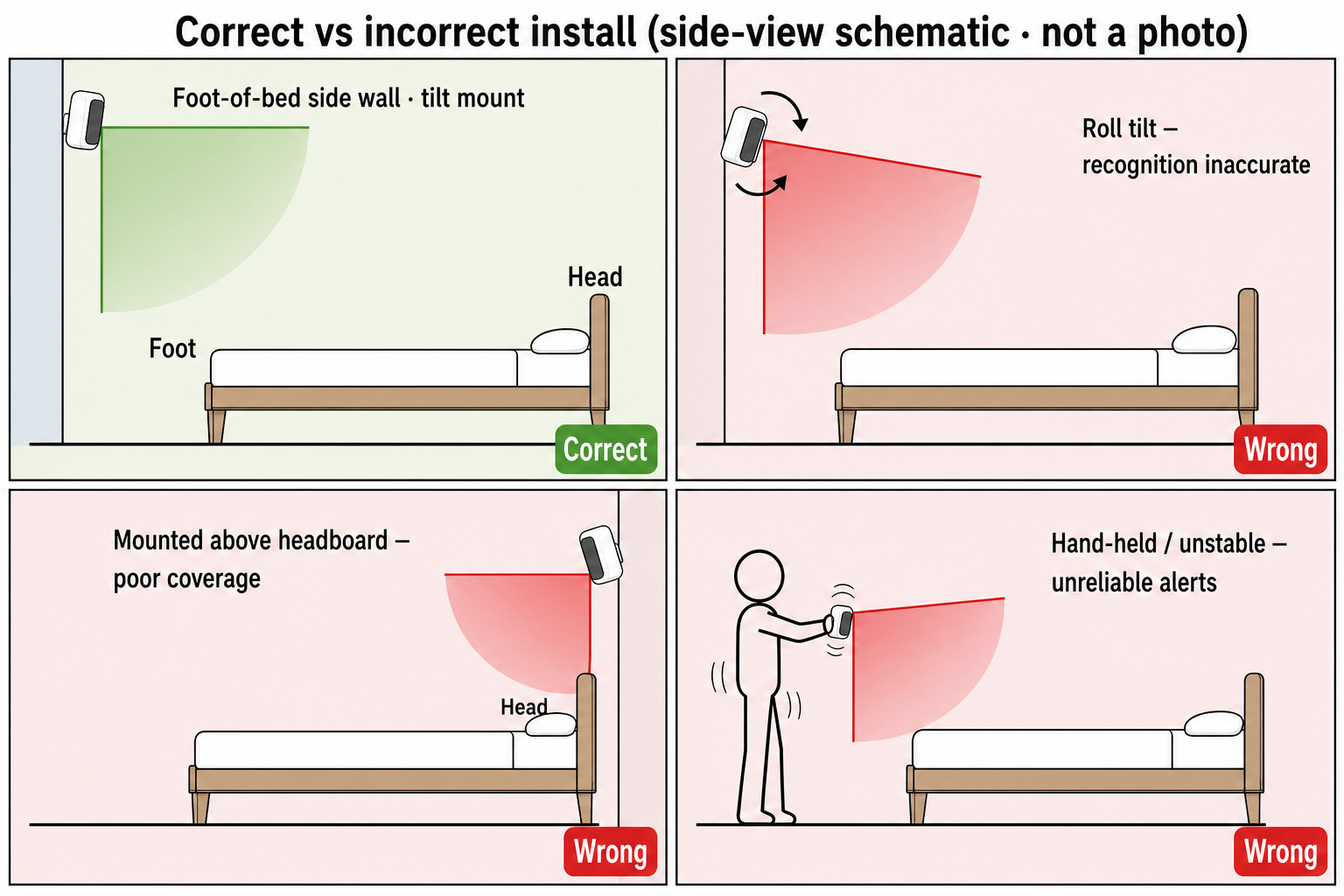
| Wrong | Effect |
|---|---|
| Roll (left/right tilt) | Skewed beam; poor recognition |
| Above headboard | Misses bed activity |
| Beam on-axis to large glass / TV / mirror | False alarms, drift, unstable recognition |
| Too close to strong reflectors (even slightly off-axis) | Same; common with fridges, metal cabinets, glass walls |
| Hand-held / unstable | Unreliable alerts |
Use the table above at install time. If symptoms appear later, see S10 FAQ.