S6 Environment & Usage Notes
Scope: Universal content — why environments interfere, post-install constraints, product behavior limits.
Not here: Where to mount by room shape → S7; scenario deployment notes → S8; symptom troubleshooting → S10.
Placement checklist → S3.4 (mechanisms in §6.2 below).
6.1 Safety
- Avoid concealed pipes/wiring when drilling
- Use a stable ladder; two-person work when elevated
6.2 Install environment
Companion to S3.4: effects and guidance by interference type.
Strong reflectors
mmWave is sensitive to reflection and mirrors. Large glass, mirrors, metal panels, and TV/screens can cause ghost targets, drift, false alarms, or unstable recognition. Software calibration cannot replace good physical placement.
| Reflector | Typical effect | Guidance |
|---|---|---|
| Large windows / glass walls | Ghost tracks, wrong count | Not on-axis; change wall or increase distance |
| TV / monitor / projection screen | Screen + metal back reflect | Not on-axis; avoid wall opposite the TV |
| Metal racks / fridge / cabinets | Large metal reflection | Don’t beam straight at a big flat panel; stay farther away |
| Mirrors / wardrobe mirrors | Track drift | Not on-axis; check mirror position first |
| Metal headboard / rails | Strong near-field reflection | Avoid beam ** hitting metal headboard** |
Common living-room mistake: mount on the wall opposite the TV, or side mount where the beam still sweeps a full glass wall.
Open view, vibration & stability
| Topic | Guidance |
|---|---|
| Open view | Keep activity in the S2.4 blue zone |
| Vibration | Do not mount near indoor AC units/outlets, ceiling fan lights, or large ceiling fans. When running, they vibrate continuously, raising noise and causing track jitter — in bad cases detection fails. Stay farther away; avoid mounting directly above or on the same wall segment |
| Fixed mount | Secure wall mount only — no hand-hold or unstable surfaces |
Not just “airflow”
The main issue is usually mechanical vibration, not wind on the sensing face. Nearby AC or fan lights can interfere even when airflow direction looks fine.
6.3 Occlusion & layout changes
- Cables/bracket must not block the sensing face
- Don’t add large furniture or screens in the beam after install
- If the unit moves or the room layout changes a lot, re-check S3 and S5
6.4 Product behavior limits
System design behavior — not faults. Scenario-specific expectations → S8.
| Topic | Notes |
|---|---|
| Multi-person | Up to about 6 targets; initial spacing helps; crowding hurts count accuracy |
| Fall alerts | 10-second alert silence (anti-repeat); sit/kneel/fake fall / quick stand-up may not alert |
| Long stillness | Person almost motionless → target may briefly disappear on UI (normal) |
| SD card | For playback/history; insert gold contacts down |
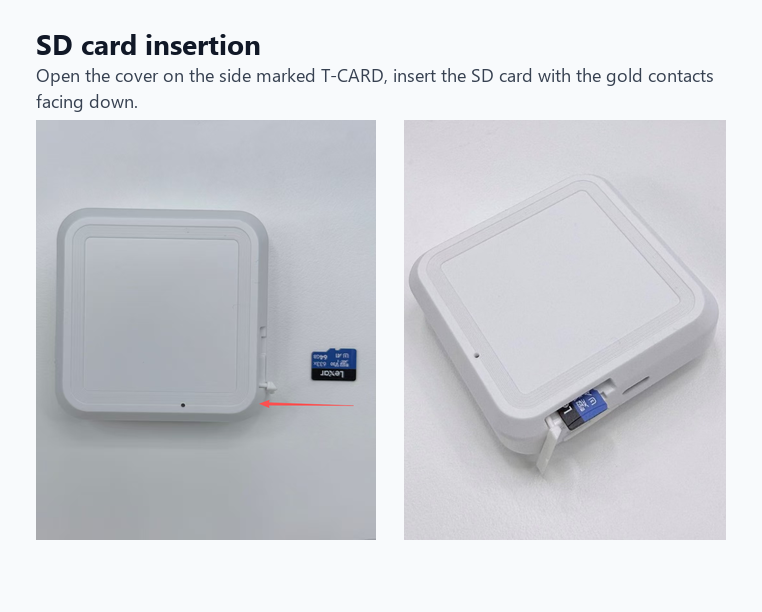
Open the side T-CARD cover; insert SD card gold contacts down.
vs S10 FAQ
Above is how the system behaves, not a fault list. For “should have alerted / shouldn’t have alerted”, see S10 Q4–Q5.
6.5 Prevention vs troubleshooting
| Concern | Prevention (this chapter / install) | Already happening (S10) |
|---|---|---|
| Reflectors, false alarms, wrong count | §6.2 | Q1, Q2, Q5 |
| Occlusion, target lost | §6.3 | Q3 |
| Fall miss / false fall | §6.4 | Q4, Q5 |
| Wrong mount, poor coverage | S3.3, S3.5 | S10 quick index |